
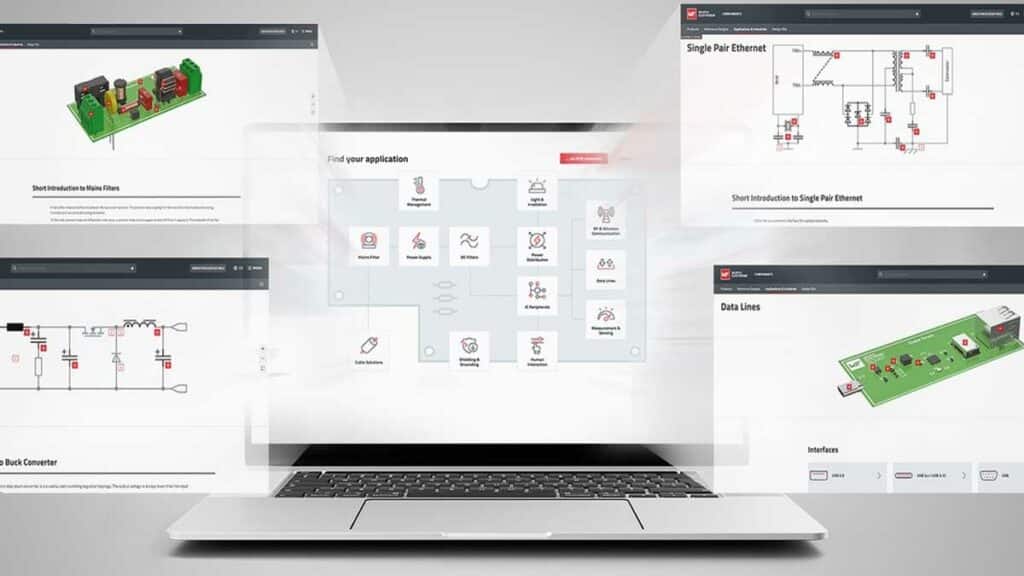
What the Product Navigator Does
The Product Navigator is a web-based selection tool that starts from application areas and typical circuit topologies instead of raw part-number lists. It integrates and extends Würth Elektronik’s existing Application Guide concept, which has been in use since 2021, and now offers a broader, more structured navigation through the portfolio.
Rather than forcing users to browse large category trees, the Navigator presents application-relevant groupings such as EMC, power conversion, thermal management, and sensor interfaces. From these entry points, users can drill down to recommended component families and then further into the standard online catalog for detailed technical data and ordering options.
Key features and benefits
The Product Navigator is aimed at helping engineers cope with the growing complexity of component selection across multiple domains and form factors.
Key features include:
- Application-first navigation that starts from practical use cases instead of abstract product hierarchies.
- Integration of the former Application Guide into a single, expanded tool for easier access to curated recommendations.
- Direct links from recommended components into the Würth Elektronik online catalog, including ordering options for samples and production quantities.
- Seamless handover to the REDEXPERT simulation and selection environment for fine-tuning component variants based on measured data.
From an engineering perspective, an application-driven entry point reduces the risk of overlooking suitable component families when one part can fulfil different functions in different circuits. For purchasers and project managers, faster identification of suitable series and part families can shorten the evaluation phase and improve communication with design teams.
Application areas and topologies covered
The Product Navigator organizes the Würth Elektronik portfolio into application areas that correspond to typical real-world design tasks and problem domains.
The main application areas include:
- Shielding and grounding
- Cable assembly solutions
- Line filters
- Power supplies
- DC filters
- Thermal management
- Optoelectronics
- Power distribution
- IC peripherals
- Human–machine interaction (switches and displays)
- High-frequency and wireless communication
- Measurement and sensor technology
Within each area, the Navigator offers representative topologies and additional application content. For example, a developer working on an EMC-compliant power supply can navigate via shielding, line filters, and DC filters, then access typical schematic structures and recommended product families. This structure helps bridge the gap between generic product tables and specific circuit-level design challenges.
Integration with REDEXPERT and online catalog
A central benefit of the Product Navigator is its connection to Würth Elektronik’s REDEXPERT environment and the standard online catalog.
Key integration aspects:
- From within the Navigator, users can jump directly to REDEXPERT to perform detailed selection and optimization based on stored, tested measurement data rather than purely theoretical models.
- Product entries in the Navigator are linked to the online catalog, where engineers can review full datasheets, parametric information, and stocking status.
- Free samples can be requested for a very wide range of components directly from the catalog, supporting fast prototyping and evaluation.
- Würth Elektronik states that components are generally available from stock, and that there is no minimum order quantity for low-volume manufacturers.
For design-in workflows, this combination of application-level guidance, measured-data-based selection, and straightforward ordering helps reduce friction between early design, validation, and initial builds.
Availability and access
The Product Navigator is available as an online tool on the Würth Elektronik website and is positioned as an evolution of the previously published Application Guide. The tool is accessible without mentioning any specific software installation, making it suitable for quick checks as well as deeper selection sessions.
Because the Navigator is tightly coupled to the online catalog, users can quickly proceed from exploring applications to checking lead times, ordering samples, or placing production orders. The absence of a minimum order quantity is particularly relevant for start‑ups, laboratories, and manufacturers with low or variable volumes.
Benefits for design engineers
From a practical standpoint, the Product Navigator addresses several recurring pain points in passive and electromechanical component selection.
Engineering-oriented benefits include:
- Reduced search time when exploring categories such as inductors, EMI filters, connectors, and sensors across overlapping application areas.
- Easier identification of cross-functional components that may serve EMC, power, or signal-conditioning roles depending on topology.
- Access to curated example circuits and topologies that can serve as a starting point or sanity check for new designs.
- Direct linkage to REDEXPERT, allowing realistic comparison of components based on loss behavior, saturation characteristics, frequency response, and other measured parameters where available.
For engineers working under schedule pressure or dealing with new topologies, having an application-centric navigation path can help avoid dead ends in parametric filters and reduce the likelihood of missing a better-suited component family.
Benefits for purchasing and project teams
The Product Navigator also offers advantages beyond pure engineering analysis, especially in cross-functional collaboration with purchasing and project management.
Purchasing-related benefits:
- Clear mapping from application/function to relevant product families, simplifying internal communication when requesting quotes or alternates.
- Visibility into stock availability and the ability to order small quantities without a minimum order threshold, which is useful for pilot runs and niche products.
- Support for standardized component choices across projects by aligning teams around a curated set of application-proven series.
By anchoring discussions in application areas and typical topologies, teams can converge on component strategies more quickly, which is particularly valuable when managing multiple projects with similar power, EMC, or sensor requirements.
Design‑in notes for engineers
When incorporating the Product Navigator into a design workflow, engineers may want to consider the following practical guidelines:
- Start from the closest application area to your main design challenge (for example, line filters for mains input compliance, DC filters for converter output stages, or high-frequency and wireless communication for RF front ends).
- Use the suggested topologies as a reference but always validate against system-level requirements such as efficiency, derating, thermal limits, and compliance margins.
- After shortlisting component families via the Navigator, switch to REDEXPERT where available to evaluate detailed performance trade-offs using measured data for parameters like core losses, impedance curves, and insertion loss.
- Confirm critical ratings and qualification details (for instance, voltage class, temperature range, safety approvals, and environmental ratings) in the individual datasheets before freezing BOMs.
- For designs with multiple overlapping constraints (EMC, thermal, mechanical, and cost), consider using the Navigator to explore alternative topologies or component combinations rather than only changing values within a single family.
Using the Navigator in this way can turn it into more than a search tool; it becomes a structured entry point into Würth Elektronik’s wider ecosystem of application notes, simulation tools, and catalog resources.
Source
This article is based on information provided by Würth Elektronik in its official press release about the Product Navigator online tool, combined with additional independent interpretation and context aimed at design engineers and component purchasers.
References
- Würth Elektronik press release: Product Navigator Directs You to the Right Component
- Würth Elektronik Product Navigator
- Würth Elektronik REDEXPERT tool

